
This is a example NeoCities website from Computer Hope, a website that's been helping everyone with computer-related questions including HTML (HyperText Markup Language), CSS (Cascading Style Sheets), and other web design questions since 1998.
Below are some helpful Computer Hope links for those creating their own Neocities web page.
Below is an example of a small snippet of information from the Computer Hope computer dictionary of over 20,000 computer terms.
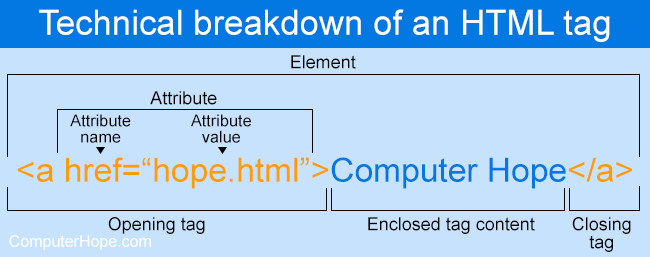
As shown in the HTML tag example above, there aren't many components. Most HTML tags have an opening tag containing the tag name, tag attributes, a closing tag containing a forward slash, and the tag name being closed. For tags that do not have a closing tag like <img>, it is best practice to end the tag with a forward slash.
Most tags are contained in a less than and greater than angle brackets, and everything between the open and close tag is displayed or affected by the tag. In the example above, the <a> tag is creating a link called "Computer Hope" that is pointing to the hope.html file.
Who doesn't like HTML buttons?


List of hundreds of HTML buttons that can be used on your website.